An orthopedic practice needs IT support built around imaging, surgery, and multiple locations. That means fast PACS and DICOM connectivity, an EHR that opens images without delay, secure links between the clinic and the ambulatory surgery center, HIPAA-grade security, and downtime procedures that have been tested. Generic office IT covers the front desk and misses most of what matters.
Picture a Tuesday clinic. A surgeon has 38 patients on the schedule, and nearly every visit starts with an X-ray on the screen. If each image takes 40 seconds to open, that surgeon loses 25 minutes to a loading bar before anyone counts the PAs and techs waiting on the same workstations.
The server is up. The EHR is online. Nobody filed an outage ticket.
In orthopedics, the image is the appointment.
The stakes go beyond slow screens. In late 2025, the New York Attorney General announced a $500,000 settlement with OrthopedicsNY after a 2023 ransomware attack exposed data on roughly 656,000 patients and employees, according to the HIPAA Journal and GovInfoSecurity. Attackers got in with compromised login credentials.
How Is Orthopedic IT Different From General Medical Practice IT?
Short answer: Orthopedic IT carries far more imaging traffic, more locations, and more surgery-day pressure than a typical primary care practice. X-rays, MRIs, and CT scans move constantly between equipment, the PACS archive, the EHR, and the surgery center. Five Nines Technology Group treats image flow as the core workload, because that is where orthopedic schedules break.
A family medicine office mostly moves text: notes, orders, prescriptions, claims. An orthopedic group moves pictures, and pictures are heavy. Every fracture follow-up, joint consult, and post-op check depends on an image opening fast on the right screen.
The footprint is wider too. Many orthopedic groups run a main clinic, satellite offices, an imaging suite, physical therapy, durable medical equipment, and an ambulatory surgery center. Surgeons move between them in a single day and expect their images and notes to follow.
|
IT demand |
Typical primary care practice |
Typical orthopedic group |
|---|---|---|
|
Core data |
Notes, orders, prescriptions |
Notes plus X-ray, MRI, and CT studies |
|
Key systems |
EHR and practice management |
EHR, practice management, PACS, imaging equipment, surgical planning tools |
|
Locations |
One or two clinics |
Clinic, satellites, imaging, PT, DME, surgery center |
|
What a slowdown costs |
Longer waits |
Backed-up clinic, delayed surgical decisions, canceled cases |
|
Outside vendors with remote access |
Few |
Many: imaging equipment, PACS, EHR, implant and DME partners |
What Happens When Imaging Slows Down in an Orthopedic Clinic?
Short answer: When imaging slows down, the whole clinic slows with it. Surgeons wait on screens, rooms back up, and staff fall back on workarounds like burning CDs or re-shooting X-rays. The usual causes are network capacity between sites, aging workstations, a PACS archive near its storage limit, or images routing to the wrong destination.
Slow imaging rarely shows up as an outage. The PACS is technically running. The images do arrive. They just arrive late, or on the wrong workstation, or only after a tech manually resends them.
The workarounds are where cost and risk hide. A patient brings outside images on a disc and nobody can import them cleanly. A study gets re-shot because the first one never reached the EHR. A provider pulls up images on a personal device because the exam room computer is too slow.
Each workaround feels small. Across a full clinic week, they add up to lost appointments, frustrated surgeons, and patient data sitting in places it should not be.
How Should IT Support Connect an Orthopedic Clinic and a Surgery Center?
Short answer: IT support should treat the clinic and the ambulatory surgery center as one connected system with separate safeguards. Images, surgical plans, and schedules need to reach the OR without manual steps, while the surgery center keeps its own network segment, backup plan, and downtime procedures so a clinic problem never cancels a surgery day.
More joint replacement work now happens outside the hospital. CMS added total knee arthroplasty to the Medicare ASC covered procedures list for 2020 and total hip arthroplasty for 2021, as reported by Becker's ASC Review and ORTHOWORLD. That shift moves high-value cases into facilities many practices own or co-own.
The surgery center changes the IT math. A clinic slowdown costs minutes. A surgery center outage on a full OR day costs cases, surgeon time, anesthesia coverage, and patient trust.
Good clinic-to-ASC IT covers four things:
- Image and plan availability in the OR. Pre-op images and templating are on the OR screen before the patient is.
- Network separation. The surgery center runs on its own segment so a compromised clinic workstation cannot reach OR systems.
- Scheduling and documentation handoff. Case schedules, consent forms, and op notes move between systems without retyping.
- A surgery-day downtime plan. Printed schedules, offline image access, and a call tree that has actually been tested.
What Cybersecurity Does an Orthopedic Practice Need?
Short answer: An orthopedic practice needs multi-factor authentication everywhere, endpoint detection and response watched by a 24/7 security operations center, encrypted and tested backups that include the imaging archive, tight control over vendor remote access, and ongoing staff training. These controls protect patient data and keep the clinic and surgery center operating during an attack.
Orthopedic groups keep showing up in breach reports. Greater Pittsburgh Orthopedic Associates reported a ransomware attack affecting almost 57,000 individuals after detecting suspicious network activity on August 10, 2025, according to the HIPAA Journal. The Orthopaedic Institute of Western Kentucky reported incidents tied to a third-party vendor, according to Becker's Spine Review.
That second case matters. Orthopedic practices depend on more outside vendors than most clinics, and many of them connect remotely to imaging and EHR systems. Every one of those connections is a door.
The regulatory bar is rising as well. HHS proposed a major update to the HIPAA Security Rule in January 2025 that would make multi-factor authentication and encryption of patient data mandatory. Its final action is now projected for July 2027 on the federal regulatory agenda, as reported by Fierce Healthcare. The current rule stays fully enforceable in the meantime, and the controls the proposal describes are already what investigators look for after a breach.
Five Nines runs an in-house SOC with analysts watching client environments around the clock. For an orthopedic group, that means someone is reviewing suspicious activity at 2 a.m., not just collecting alerts for Monday.
Where Does Orthopedic IT Actually Break?
Short answer: Orthopedic IT usually breaks at the handoffs between systems, not inside any single system. Five Nines maps those handoffs with the Image-to-Incision Chain, five links from the moment an image is captured to the moment a surgeon operates. A weak link anywhere slows clinic, delays surgery, or exposes patient data.
Most IT conversations in orthopedics start with a complaint about one system. The PACS is slow. The EHR froze. The surgery center Wi-Fi dropped. Those are symptoms. The real issue is usually the connection between two systems that nobody owns end to end.
The Five Nines Image-to-Incision Chain
|
Link |
What it covers |
What it looks like on the floor when it breaks |
What IT support should own |
|---|---|---|---|
|
1. Capture |
X-ray, MRI, CT, and ultrasound equipment and its network connection |
Techs resend studies by hand. Images show up with the wrong patient or date. |
Device inventory, network connectivity, vendor access controls, patching windows coordinated with the equipment vendor |
|
2. Archive |
PACS storage, DICOM routing, and outside image import |
Studies take minutes to appear. Discs from referring practices will not load. |
Storage capacity planning, routing rules, backup of the image archive, performance monitoring |
|
3. Review |
Exam room and reading workstations, monitors, and image viewers |
Surgeons wait on loading screens. Providers move rooms to find a faster computer. |
Workstation lifecycle, display standards, fast image access at every site |
|
4. Plan |
EHR, surgical templating, scheduling, and consent |
Templates and images are missing at pre-op. Staff retype schedules between systems. |
Integration monitoring between PACS, EHR, and scheduling, access management |
|
5. Operate |
Surgery center network, OR workstations, and surgery-day downtime plan |
Cases start late or cancel when systems lag. Nobody knows the paper backup process. |
Network separation, OR-ready image access, tested downtime and recovery procedures |
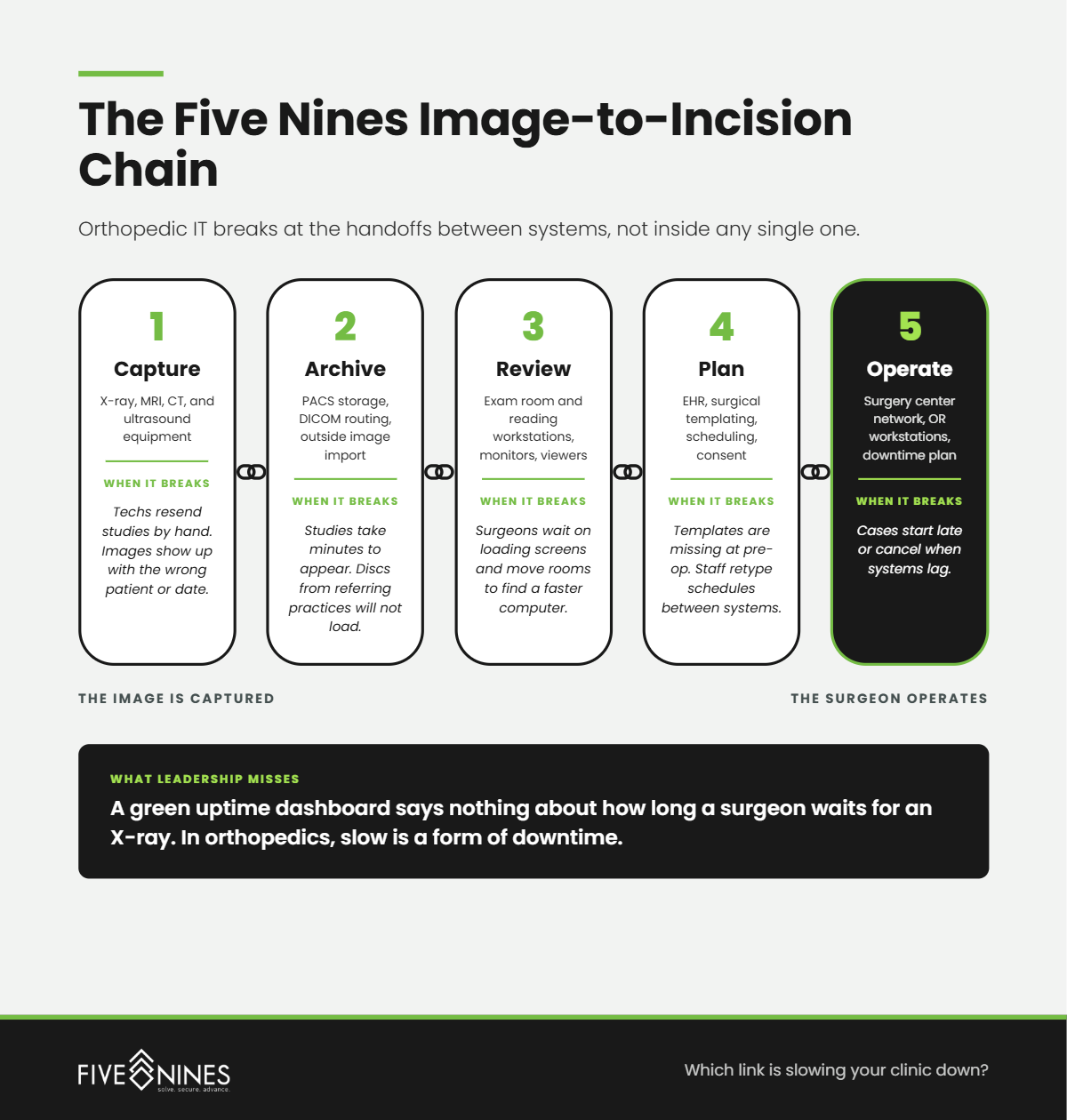
Use the chain as a self-check. If your staff can name a workaround at any link, that link is where your IT support should start.
The Hidden Risk
Every workaround in an orthopedic clinic, from a burned CD to an image opened on a personal phone, moves patient data outside the systems built to protect it.
What Leadership Misses
A green uptime dashboard says nothing about how long a surgeon waits for an X-ray. In orthopedics, slow is a form of downtime.
Should an Orthopedic Practice Hire IT Staff or Outsource?
Short answer: Most independent orthopedic groups need more coverage than one or two internal hires can provide. A managed or co-managed IT partner adds 24/7 monitoring, security operations, compliance support, and strategic planning, while internal staff keep handling day-to-day requests. Five Nines supports both models for healthcare organizations.
A single IT hire cannot cover help desk, PACS issues, surgery center networks, security monitoring, and compliance documentation at the same time. Nobody can be on call every night and still take vacation.
A co-managed model keeps the people who know your surgeons and workflows. Five Nines adds the security operations center, compliance framework, and virtual CIO planning behind them, so your team stops firefighting and starts planning.
What Does Five Nines Look for in an Orthopedic IT Assessment?
Short answer: Five Nines looks for the patterns that quietly slow orthopedic clinics and expose patient data: imaging equipment on outdated systems, vendor remote access nobody reviews, backups that skip the image archive, and surgery centers sharing a flat network with the clinic. Each one is fixable once someone names it.
- Imaging equipment running older operating systems. X-ray and imaging workstations often stay on older software because the equipment vendor controls updates. Those devices need their own network segment and monitoring.
- Vendor remote access that never gets reviewed. Imaging, PACS, and EHR vendors are given standing remote access during installation, and nobody revisits it. Those accounts often lack multi-factor authentication.
- Backups that protect the EHR but not the image archive. The EHR backup is tested. The PACS archive, often the largest data set in the practice, is assumed to be covered.
- A flat network across clinic and surgery center. One compromised front desk computer can reach OR systems because nothing separates them.
- Downtime plans written for the clinic only. The surgery center has no tested process for running a surgery day while systems are down.
What Questions Should an Orthopedic Practice Ask an IT Provider?
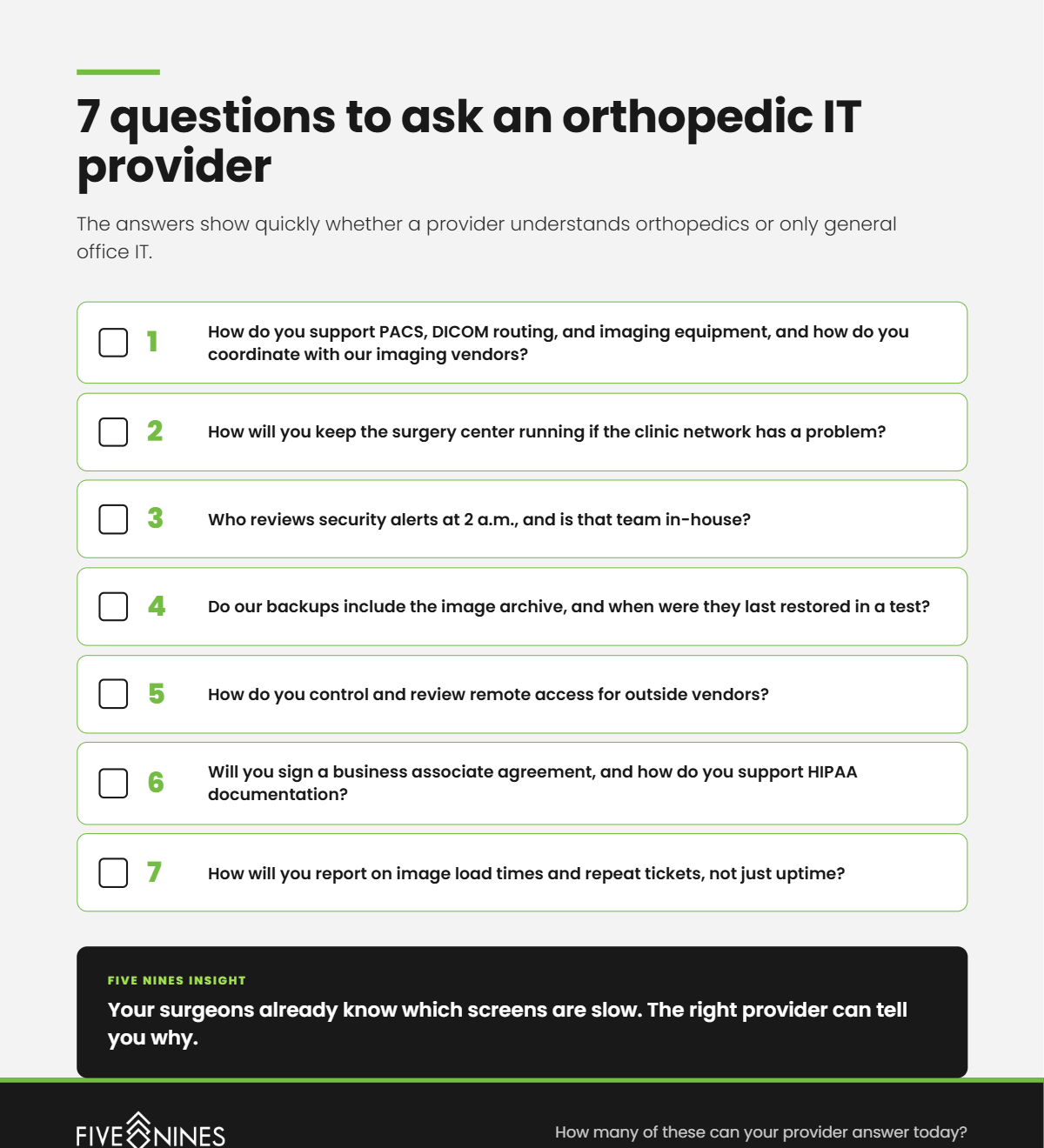
Short answer: Ask how the provider supports imaging systems and PACS, how they separate the surgery center network, who watches security alerts overnight, whether backups include the image archive, and how they manage vendor remote access. The answers show quickly whether a provider understands orthopedics or only general office IT.
- How do you support PACS, DICOM routing, and imaging equipment, and how do you coordinate with our imaging vendors?
- How will you keep the surgery center running if the clinic network has a problem?
- Who reviews security alerts at 2 a.m., and is that team in-house?
- Do our backups include the image archive, and when were they last restored in a test?
- How do you control and review remote access for outside vendors?
- Will you sign a business associate agreement, and how do you support HIPAA documentation?
- How will you report on image load times and repeat tickets, not just uptime?
Which Link in Your Image-to-Incision Chain Is Slowing You Down?
If your surgeons complain about slow images, your staff have workarounds they no longer mention, or your surgery center shares more with the clinic network than it should, the problem is fixable. It starts with knowing exactly where the chain is weak.
A Five Nines orthopedic IT assessment identifies:
- Where images slow down between equipment, PACS, EHR, and the OR
- Which vendor accounts have remote access, and whether they are protected
- Whether backups cover the image archive and can actually be restored
- How well the surgery center is separated from clinic systems
- Which repeat tickets point to a lifecycle or root-cause problem
You leave with a scored Image-to-Incision Chain and a prioritized fix list your leadership team can act on.
Your surgeons already know which screens are slow. The assessment tells you why.