A hospital backup and disaster recovery plan should include protected copies of every critical system, a restore order set by clinical priority, recovery times measured in an actual test, and downtime procedures staff can run without the network. Most hospitals have the first item. Far fewer can prove the other three.
Picture the morning after a ransomware attack. The backup console shows a neat column of green checkmarks from last night. The EHR is down, the domain controllers are encrypted, and nobody can sign in to the server that holds the backups. Pharmacy is working from paper. Registration is writing names on a clipboard.
The backup job succeeded. The hospital still can't open a chart.
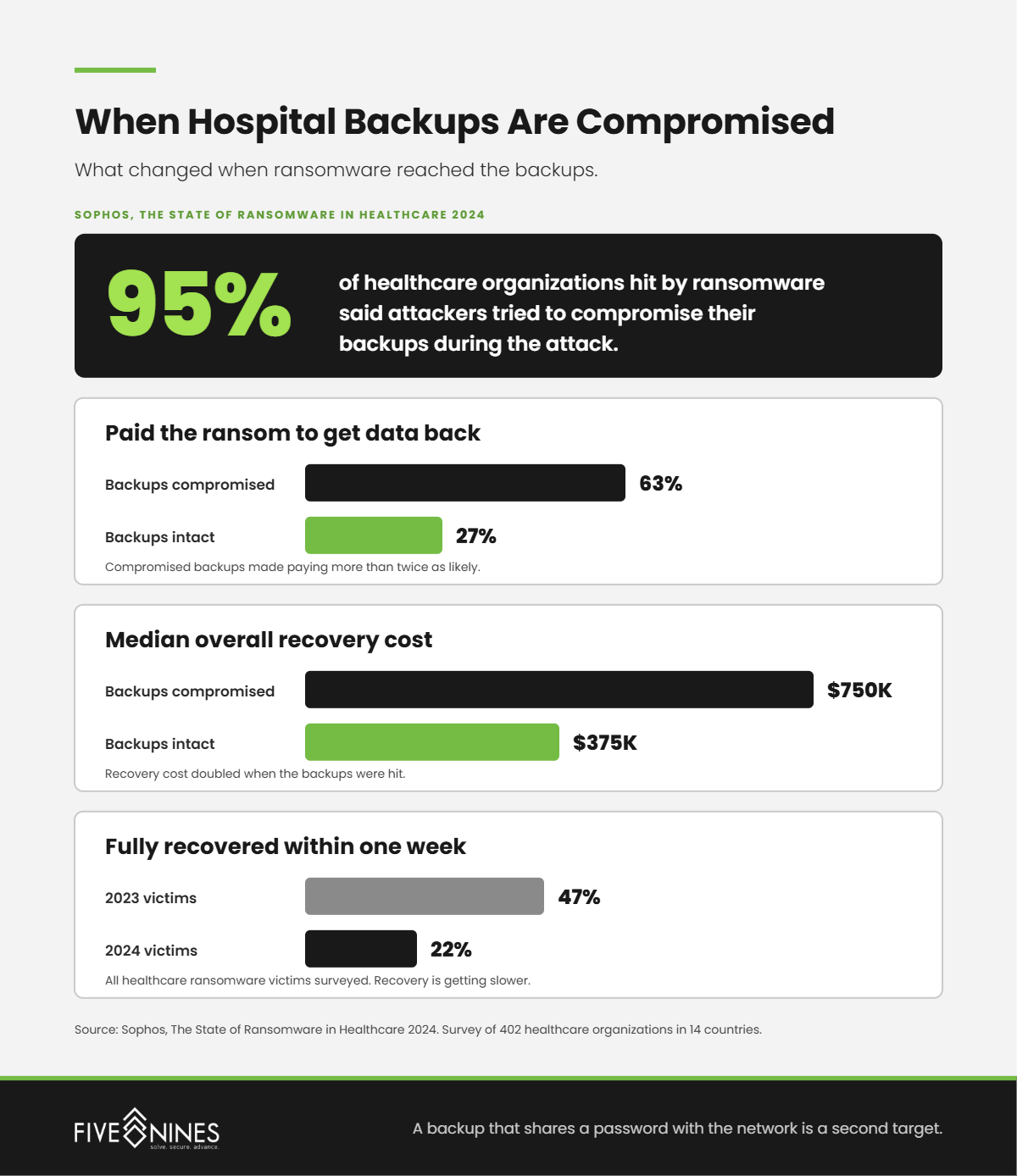
That gap is not hypothetical. In the Sophos State of Ransomware in Healthcare 2024 survey of 402 healthcare organizations, 95% of those hit by ransomware said attackers tried to compromise their backups during the attack.
What Is the Difference Between Backup and Disaster Recovery for a Hospital?
Short answer: Backup is a copy of your data stored somewhere else. Disaster recovery is the tested process of restoring systems, in clinical priority order, fast enough that care can continue. Five Nines Technology Group puts it to hospital leaders this way: backup answers "do we still have the data?" Disaster recovery answers "how many hours until nurses can chart again?"
Most hospital leaders hear "we have backups" and relax. It is a reasonable instinct and the wrong conclusion.
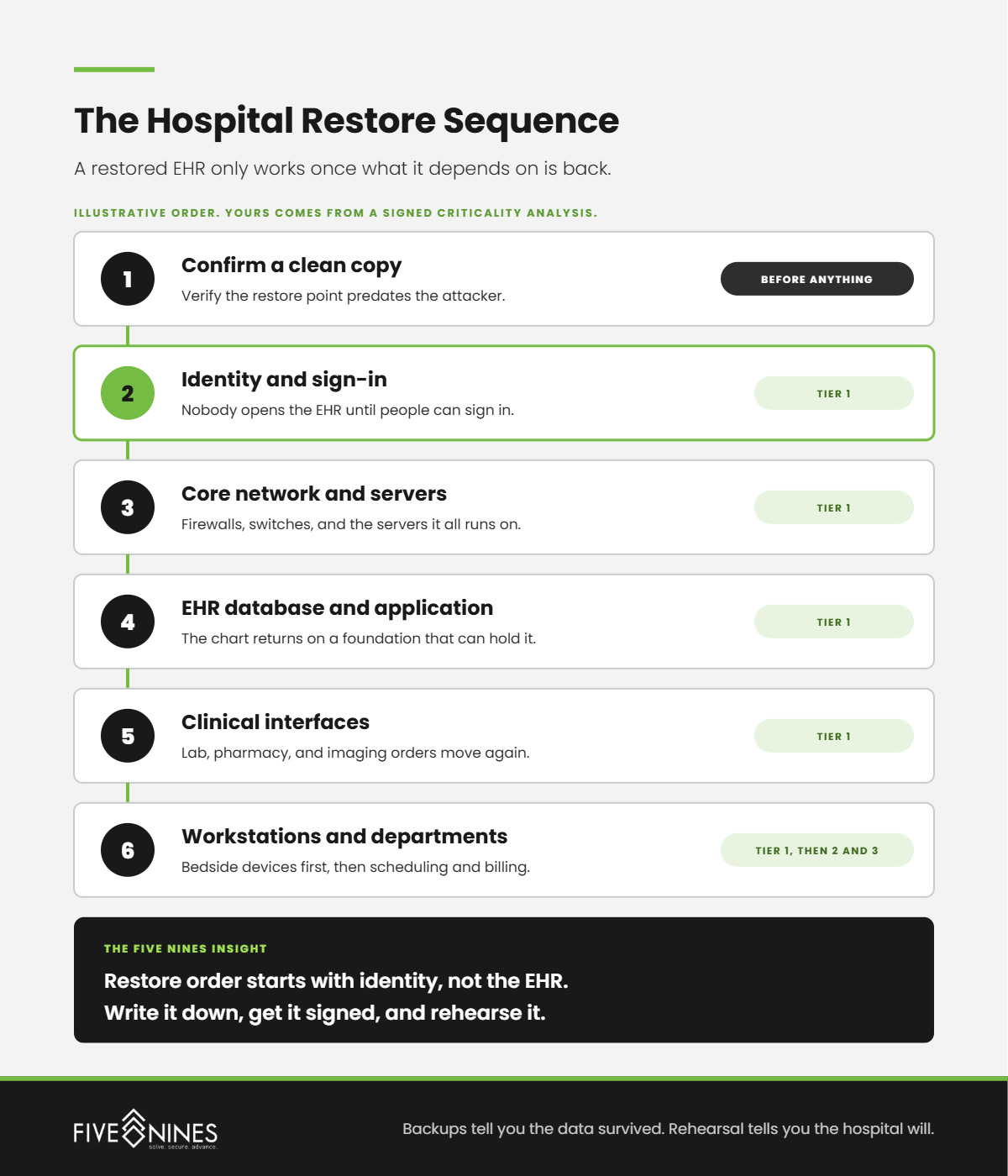
Most teams think recovery is a storage problem. It is not. It is a sequencing problem.
A modern EHR does not run alone. It depends on the identity system that lets people sign in, the database servers underneath it, the network that connects departments, and the interfaces that carry orders to lab, pharmacy, and imaging. Restore the EHR database without those pieces and you have a system that is technically online and clinically useless.
Five Nines Insight
Restore order starts with identity, not the EHR. If nobody can sign in, a perfectly restored chart database is still a locked door.
Why Are Hospital Backups a Target in Ransomware Attacks?
Short answer: A working backup is the main reason a hospital can refuse to pay. Sophos found that healthcare organizations whose backups were compromised were more than twice as likely to pay the ransom (63% versus 27%), and their median recovery costs doubled, from $375,000 to $750,000.
Attackers know this, so the backup system is one of the first places they look. With administrator passwords stolen earlier in the attack, they can delete snapshots, wipe backup repositories, or encrypt them along with everything else. The backup software reports nothing unusual until someone tries to restore.
Recovery is also getting slower. In the same Sophos report, only 22% of healthcare ransomware victims fully recovered within a week in 2024, down from 47% the year before.
Four protections change the outcome:
- Immutable copies. Backups that cannot be changed or deleted for a set period, even by an administrator.
- Separate credentials. The backup system shares no accounts or passwords with the production network, and every sign-in requires multifactor authentication.
- A separated copy. At least one copy lives outside the hospital's main network, offsite or in a separate cloud environment.
- Someone watching. Deletion attempts and unusual backup activity alert a security team at any hour.
The Hidden Risk
A backup that shares a password with the network it protects is not a backup. It is a second target.
What Does HIPAA Require for Hospital Backup and Disaster Recovery?
Short answer: The current HIPAA Security Rule requires a contingency plan with three required parts: a data backup plan, a disaster recovery plan, and an emergency mode operation plan. Testing those plans and ranking systems by criticality are listed as "addressable," which many organizations have treated as optional.
Those requirements sit in the contingency plan standard at 45 CFR 164.308(a)(7). They date to 2003, and they say nothing about how fast a hospital must recover.
That could change. In January 2025, the HHS Office for Civil Rights published a proposed update to the Security Rule in the Federal Register. It would require written procedures to restore critical systems and data within 72 hours, guided by a criticality analysis that sets the restore order. The proposal is not final. A Paubox report on the federal regulatory agenda notes that HHS moved its target for final action to July 2027 at the earliest, and the current rule stays in force until then.
|
Contingency element |
Current Security Rule |
Proposed rule (not final) |
|---|---|---|
|
Data backup plan |
Required |
Required |
|
Disaster recovery plan |
Required |
Required, with written procedures to restore critical systems within 72 hours |
|
Testing and revision |
Addressable |
Required |
|
Criticality analysis |
Addressable |
Required, and sets the restore order |
Five Nines' advice: do not wait for the final rule. The 72-hour benchmark is the same question your board will ask the morning after an attack. How long until we are back?
What Leadership Misses
Recovery time is not an IT metric. It is the number of hours your hospital runs on paper.
How Can a Hospital Tell Whether It Can Actually Recover?
Short answer: Time a real restore. Five Nines uses the Recovery Readiness Ladder to place hospitals in one of four stages, from "backups run every night" to "recovery rehearsed with clinical staff." The stage that changes outcomes is the third one: the first time someone measures how long a full restore actually takes.
The Five Nines Recovery Readiness Ladder
|
Stage |
What it looks like on the floor |
What happens in a real attack |
What moves you up |
|---|---|---|---|
|
1. Copied |
Nightly jobs run. Success emails land in an inbox nobody owns. |
Backups can be deleted or encrypted along with everything else. |
Separate backup credentials and add an immutable copy. |
|
2. Protected |
An immutable, separated copy exists, with its own credentials and MFA. |
The data survives. Restore order and timing are unknown. |
Run a timed restore of the full EHR stack. |
|
3. Proven |
Scheduled test restores. Measured recovery times for every tier. |
IT knows how long recovery takes and what comes back first. |
Bring clinical leaders into a downtime drill. |
|
4. Rehearsed |
Clinical downtime drills. Paper procedures stored offline. Restore order signed by leadership. |
Nurses, pharmacy, and registration know what hours 1 through 72 look like. |
Re-test after every major system change. |
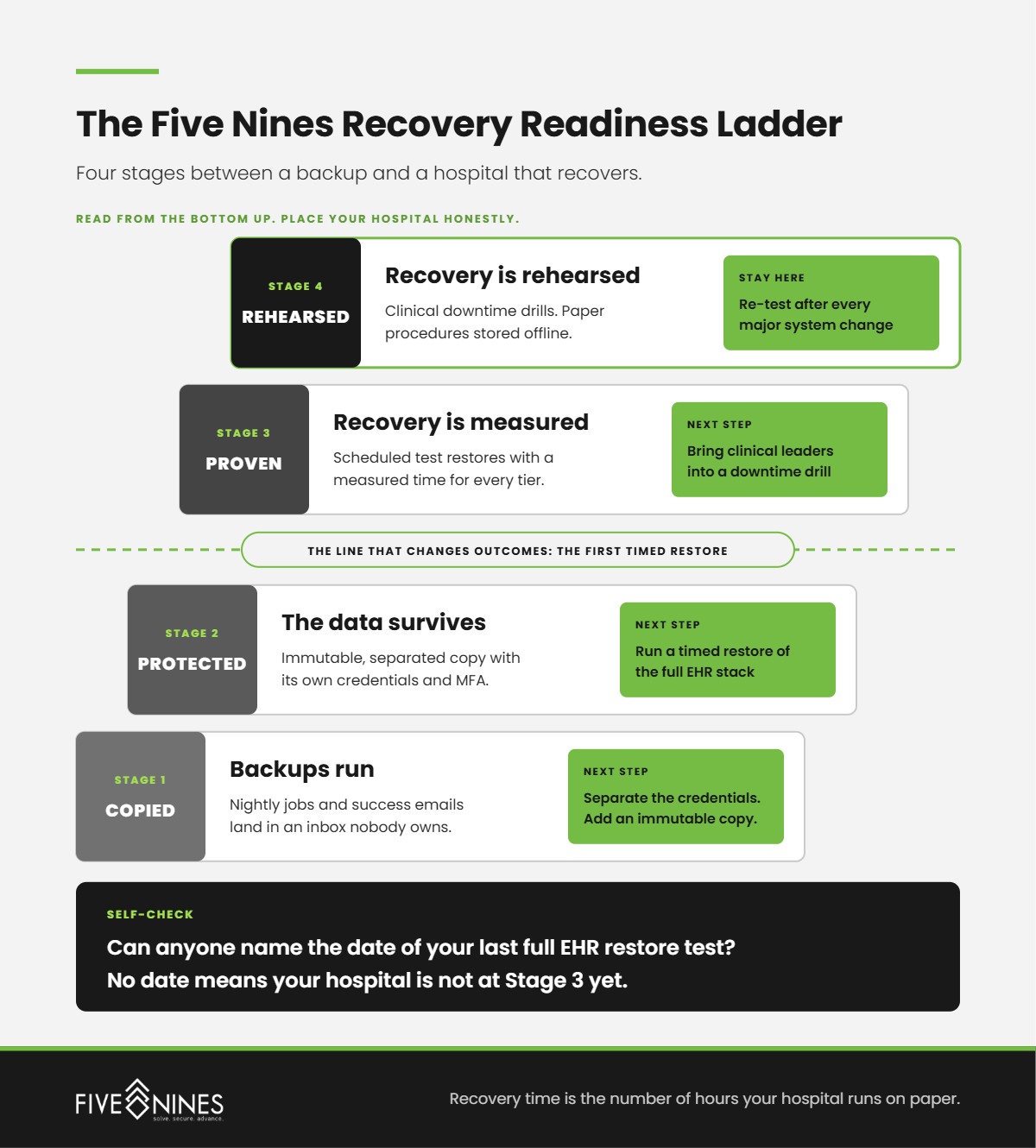
Use the "on the floor" column to place your hospital honestly. If nobody can name the date of the last full EHR restore test, you are not at Stage 3 yet.
What Recovery Times Should a Hospital Plan Around?
Short answer: There is no universal number. Recovery targets should come from a criticality analysis that clinical and IT leaders sign together. Five Nines starts hospitals with three tiers: systems patients wait on, systems departments wait on, and systems that can wait days. The proposed HIPAA update treats 72 hours as the outer limit for critical systems.
Two terms do the work. Recovery time objective (RTO) is how long a system can be down. Recovery point objective (RPO) is how much data you can afford to lose, counted backward from the outage. A four-hour RPO means up to four hours of entries may need to be re-entered from paper.
|
Tier |
Example systems |
The planning question |
|---|---|---|
|
Tier 1: Patients wait on it |
Identity and sign-in, EHR, pharmacy dispensing, lab and imaging interfaces |
How many hours can we safely run on paper? |
|
Tier 2: Departments wait on it |
Scheduling, billing and claims, email |
How many days before revenue or communication breaks? |
|
Tier 3: It can wait |
Archives, file shares, HR and finance reporting |
What can come back after the hospital is stable? |
Your tiers will not match this table exactly. That is the point of the analysis. What matters is that the order exists in writing, leadership signed it, and IT has rehearsed it.
What Does Five Nines Look for in a Hospital Backup Review?
These are the patterns Five Nines engineers check first, because each one quietly turns a backup into false confidence.
- Success emails, no restore owner. Backup reports arrive every morning and go to a folder. Nobody's job includes proving a restore works.
- Backups on the same credentials. The backup console sits on the same domain and admin accounts as everything else, so one stolen password reaches both.
- The vendor assumption. Leaders assume the EHR vendor or a cloud application backs up their data. The contract may promise something narrower.
- Everything is priority one. Without a criticality ranking, IT restores systems in whatever order they happen to come up.
- Downtime packets on the network. Paper downtime forms and procedures live on the same file share that just went down.
- One person knows how. The restore process lives in one engineer's head, and that engineer is on vacation the week it matters.
What Should a Hospital Ask a Backup and Disaster Recovery Provider?
Bring these six questions to your current provider or any provider you are evaluating. A vague answer is an answer.
- When did you last perform a full restore of our EHR environment, and how long did it take?
- Are our backups immutable, and who holds the credentials that could delete them?
- Is at least one copy separated from our production network?
- Who watches the backup system for tampering at 2 AM?
- What restore order have we agreed on, and who signed it?
- What does our business associate agreement say about notifying us when you activate a contingency plan?
How Does Five Nines Technology Group Handle Hospital Backup and Disaster Recovery?
Short answer: Five Nines runs backup, disaster recovery, and security as one system. Private cloud backups are automated and immutable, recovery targets are defined for each workload, data sits in SOC 2 Type II certified facilities, and a 24/7 Security Operations Center watches for tampering. The team that spots the attack is the team that restores.
When backup sits with one vendor, security with another, and infrastructure with a third, the first hours of a ransomware event go to phone calls. Each vendor points at the next one while the hospital runs on paper.
Five Nines puts help desk, infrastructure, private cloud, and security under one roof. One call starts the recovery, and the people answering already know your environment, your restore order, and your clinical priorities.
How Long Would Your Hospital Run on Paper?
If your backup reports say "successful" but nobody can tell you how long a full EHR restore takes, you already know the question this assessment answers.
A Five Nines Recovery Readiness Assessment identifies:
- Where your backups live, and who holds the credentials that could delete them
- Whether an immutable, separated copy exists for every critical system
- How long a restore of your EHR stack takes
- Whether your restore order matches your clinical priorities
- Gaps against the HIPAA contingency plan standard and the proposed 72-hour benchmark
You leave with your stage on the Five Nines Recovery Readiness Ladder and a prioritized list of what to fix first.
Backups tell you whether the data survived. This tells you whether the hospital will.