Which Managed IT Services for Healthcare Support EHR and HIPAA?
Managed IT services for healthcare work best when one accountable team owns everything between a clinician and the chart: the workstation, the login,...
.png)
The co-managed IT services that best support an overworked internal IT team take over the work that never stops or needs rare skills: 24x7 security monitoring, patch management, after-hours help desk coverage, backup verification, and compliance evidence. Your team keeps what only it can do: business context, priorities, and ownership of the systems the company runs on.
It looks the same in most mid-market organizations. The IT manager patches servers on Saturday because there is no other window. The systems administrator gets the 2 a.m. alert and the 8 a.m. password reset. The firewall upgrade has been "next quarter" for three quarters.
Exhaustion is a routing problem before it is a staffing problem.
Every ticket, alert, and project still routes to the same two or three people. A co-managed partner fixes that only when the work is split on purpose. In the 2025 ISC2 Cybersecurity Workforce Study, which surveyed 16,029 professionals, 33% said their organizations lack the resources to staff their teams adequately, and 88% had experienced at least one significant security consequence tied to a skills shortage.
Short answer: Co-managed IT services are a shared model where an internal IT team keeps ownership of its environment while a managed service provider takes on defined responsibilities, such as 24x7 monitoring, security operations, patching, or help desk overflow. Five Nines Technology Group supports internal IT teams this way from its Lincoln, Nebraska headquarters.
Fully managed IT replaces the IT department. Co-managed IT reinforces it. The internal team still sets priorities, approves changes, and knows why the ERP has that one integration nobody wants to touch.
That difference matters to the people already on staff. Done well, co-managed IT is how a company keeps its IT team, not how it replaces them.
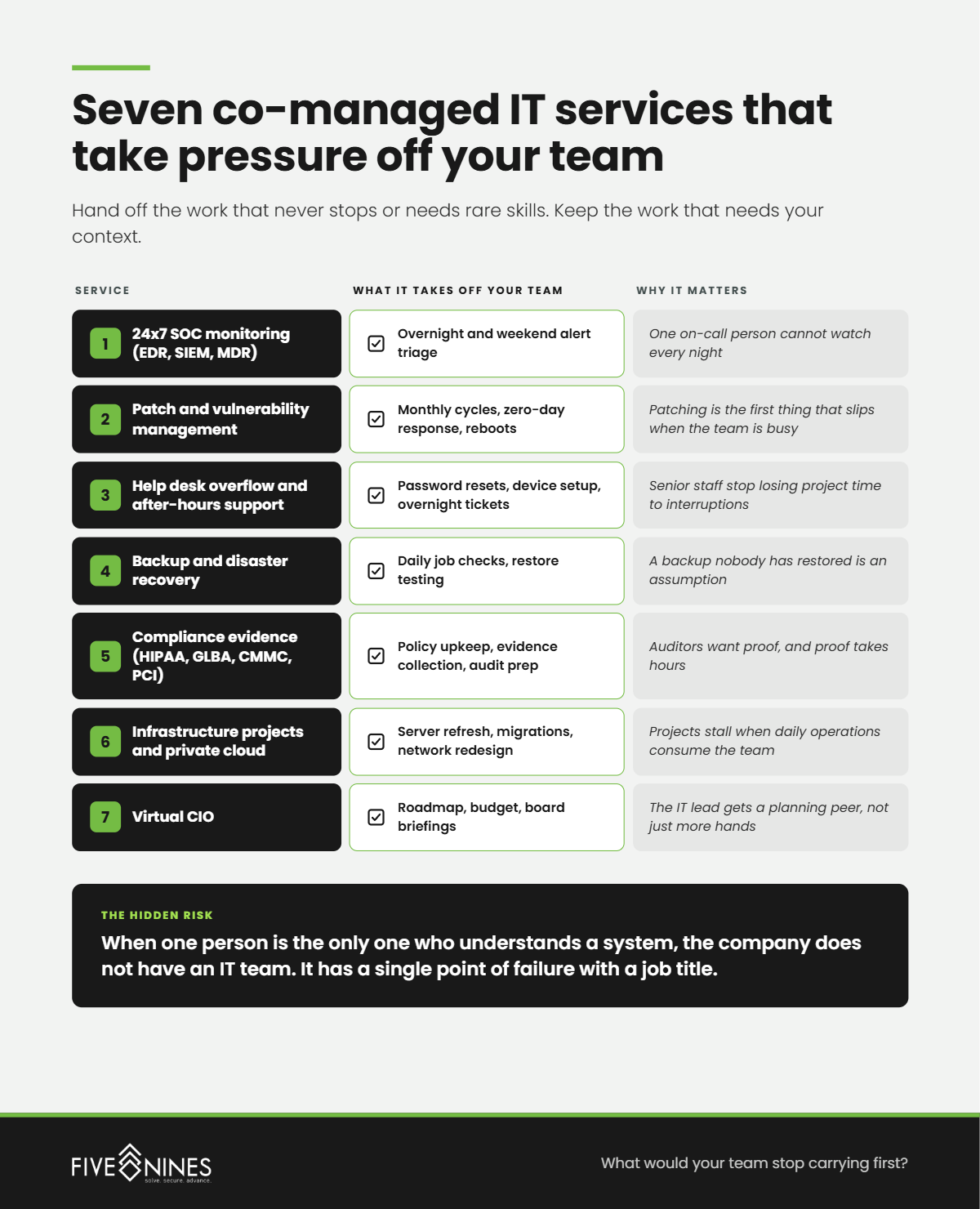
Short answer: The services that relieve the most pressure run around the clock or require specialized skills: 24x7 SOC monitoring and response, patch and vulnerability management, after-hours and overflow help desk, backup monitoring and restore testing, and compliance documentation. Five Nines delivers each as a shared service alongside internal teams.
|
Service |
What it takes off your team |
Why it matters |
|---|---|---|
|
24x7 SOC monitoring (EDR, SIEM, MDR) |
Overnight and weekend alert triage |
One on-call person cannot watch every night |
|
Patch and vulnerability management |
Monthly cycles, zero-day response, reboots |
Patching is the first thing that slips when the team is busy |
|
Help desk overflow and after-hours support |
Password resets, device setup, overnight tickets |
Senior staff stop losing project time to interruptions |
|
Backup and disaster recovery |
Daily job checks, restore testing |
A backup nobody has restored is an assumption |
|
Compliance evidence (HIPAA, GLBA, CMMC, PCI) |
Policy upkeep, evidence collection, audit prep |
Auditors want proof, and proof takes hours |
|
Infrastructure projects and private cloud |
Server refresh, migrations, network redesign |
Projects stall when daily operations consume the team |
|
Virtual CIO |
Roadmap, budget, board briefings |
The IT lead gets a planning peer, not just more hands |
Short answer: Internal IT teams burn out because the work is fragmented and never ends. Round-the-clock alerts, constant interruptions, and projects squeezed into evenings wear down small teams. ISC2's 2025 study found 29% of organizations cannot afford to hire the skills they need to secure themselves.
A ticket queue can look reasonable on a dashboard and still be crushing the people behind it. The dashboard counts tickets. It does not count the 11 p.m. alert, the Saturday maintenance window, or the project interrupted a dozen times before lunch.
Then there is the skills problem. A team of three can run the business systems well and still have no one who has tuned a SIEM, written a System Security Plan, or rebuilt a failed host at 3 a.m. Those are disciplines, not tasks.
The Hidden Risk
When one person is the only one who understands a system, the company does not have an IT team. It has a single point of failure with a job title.
Short answer: Split the work by ownership, not by task list. Five Nines uses the Co-Managed Ownership Map, which sorts every IT responsibility into four lanes: keep, share, hand off, and escalate. Each lane has a named owner, so nothing falls between two teams and nothing gets done twice.
The Five Nines Co-Managed Ownership Map
|
Lane |
What belongs here |
What it looks like on the floor |
Owner |
|---|---|---|---|
|
1. Keep |
Business priorities, application ownership, vendor relationships |
Your team decides what changes and when, and knows which department cannot go down at month end |
Internal IT |
|
2. Share |
Change management, incident communication, documentation, major projects |
Both teams work from the same records. Handoffs are written, not remembered. |
Both, with a named lead per item |
|
3. Hand off |
24x7 monitoring, patching, backup checks, after-hours help desk |
Your team reads a morning report instead of taking a midnight call |
Five Nines |
|
4. Escalate |
Active incidents, compliance audits, disaster recovery, specialty engineering |
When a problem exceeds the team's depth, the path and the person are decided in advance |
Five Nines leads, internal IT approves |
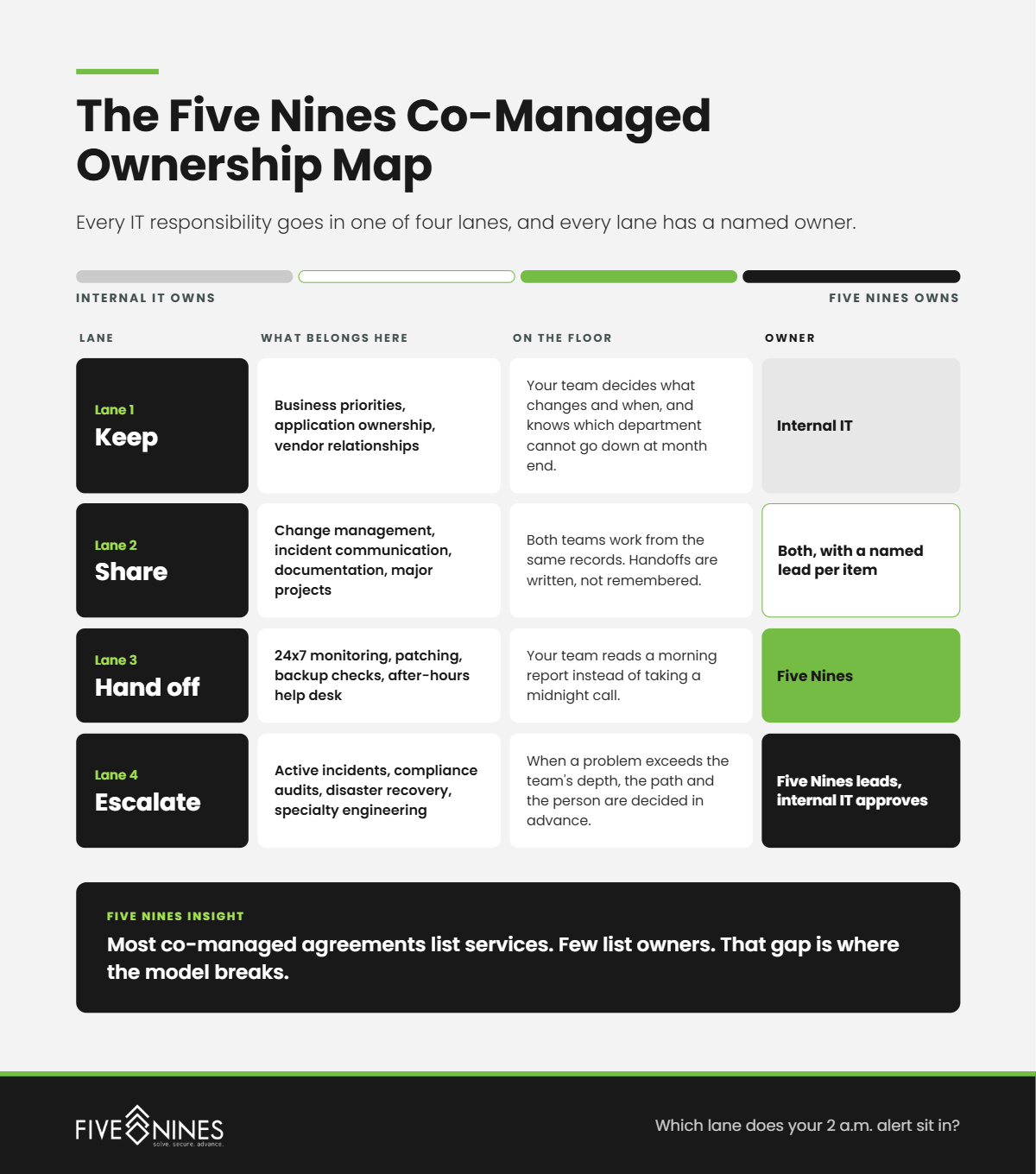
Most co-managed agreements list services. Few list owners. That gap is where the model breaks.
Short answer: Co-managed IT breaks down at the seams between the two teams: unclear ownership, separate tools, undocumented handoffs, and escalation paths nobody agreed on. Two capable teams can each assume the other is handling the same problem. Defining ownership before onboarding prevents the most common failures.
Picture it. A security alert fires at 1 a.m. The provider's SOC sees it and opens a ticket. The ticket lands in a queue the internal team checks at 8 a.m. Each team did its job, and nobody stopped the threat.
What Leadership Misses
A partner adds capacity only when it also adds clarity. Two teams with unclear ownership can move slower than one tired team.
Short answer: When Five Nines assesses overworked internal IT teams, engineers most often find knowledge, alerts, and maintenance concentrated in one or two people. The gaps are rarely about skill. They are about coverage, documentation, and what quietly stopped getting done.
Short answer: In healthcare and banking, co-managed IT usually keeps clinical or core banking application ownership in-house while the partner covers 24x7 security monitoring and compliance evidence. Five Nines supports HIPAA for healthcare organizations and GLBA for financial institutions, so the shared model also shares the audit workload.
A clinic's IT team owns the EHR relationship, clinical workflows, and conversations with providers. The partner watches for threats overnight, keeps patching current at every location, and maintains the evidence a HIPAA risk analysis depends on. If the partner touches systems holding ePHI, a Business Associate Agreement is part of the arrangement.
A community bank or credit union keeps the core processor relationship and its examiner conversations. The partner handles continuous monitoring, vulnerability management, and documentation that supports GLBA safeguards and exam preparation.
Short answer: Ask a co-managed IT provider to show exactly how ownership, tools, and escalation will work with your team: who gets paged at 2 a.m., whose ticketing system is the record, what your team keeps control of, and how scope adjusts as your needs change.
If your IT team is patching on weekends, sleeping next to the alert phone, or pushing the same project to next quarter again, the problem is not effort. It is ownership.
The Five Nines Co-Managed IT Assessment identifies:
You leave with a draft Co-Managed Ownership Map for your environment.
The strongest internal IT teams are not the ones doing the most. They are the ones who decided, on purpose, what they no longer have to carry.
.png)
Managed IT services for healthcare work best when one accountable team owns everything between a clinician and the chart: the workstation, the login,...
Your EHR going down during patient hours is not just an IT inconvenience. It delays diagnoses, pushes appointments into overtime, and erodes the...
Internal IT is the right choice when your company needs someone on site every day who knows your people, your equipment, and your quirks. Managed IT...