Reactive IT vs Preventative IT: Making the Most of Your IT Investment
Reactive IT waits for things to break; preventative IT works to stop them from breaking in the first place. For a growing, regulated business, that...
Managed IT isn't one-size-fits-all. Different pricing models serve different needs, and not all deliver the same value — especially for regulated industries like healthcare and finance.
Here's a breakdown of the 4 main models US businesses encounter, with real ranges, pros/cons, and when each makes sense for 25-500 employee organizations.
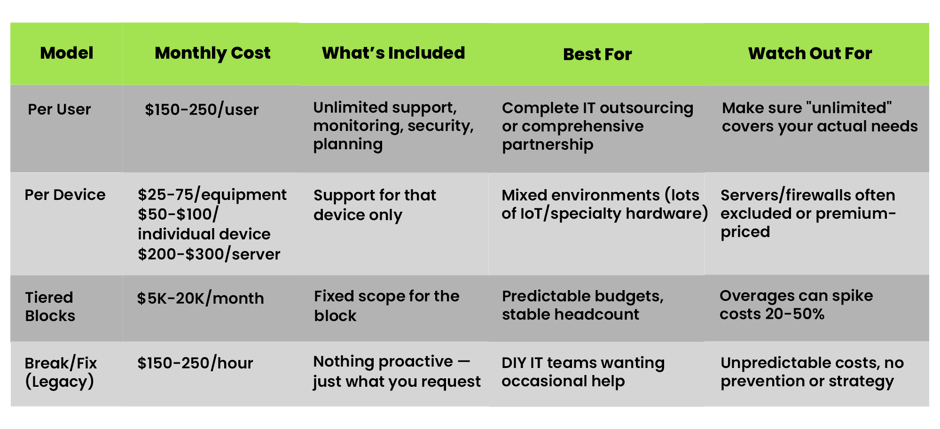
How it works: One price covers everything for each employee — support desk, infrastructure, security, planning.
Typical range: $150 baseline → $250 comprehensive
Why this wins for regulated industries:
Example: 75-employee clinic = $11,250-$14,625/month for complete IT operations.
Not ideal if: You have massive device variance or want to own zero infrastructure responsibility.
How it works: Price per laptop/server/printer. Support is limited to that device.
Typical range:
$25→ 75/equipment
$50→ $100/individual device
$200→ $300/server & firewall
When it works:
Regulated industry gotcha: Servers and firewalls (your biggest risk points) often cost 2-3x more per device.
Example: 50 users (200 devices) = $11K-$19K/month, narrower scope than per-user.
How it works: Fixed monthly fee for a "block" of users/services. Overages charged hourly.
Typical range: $6K (25 users) → $25K+ (250+ users)
Strengths:
Weaknesses:
Example: 100-user block at $12K/month + $2K overages = unpredictable reality.
How it works: Pay only when something breaks. No monthly commitment.
Typical range: $150-250/hour + travel/materials
Why it fails regulated businesses:
The math: Most "break-fix" clients convert to managed services after 1-2 quarters of pain.
Ask these 5 questions:
Pro tip: Request a "total cost of ownership" breakdown including downtime risk, not just the quote.
Downtime math: 1 hour = $500-$2,000+ depending on industry. Annual target: under 45 hours.
Compliance fines: HIPAA breach starts at $50K. PCI at $100K+.
Cheap models cost more long-term through outages, manual work, and regulatory exposure.
The best pricing model is irrelevant if the provider lacks:
Next step: Map your current IT spend on these models. What gaps are costing you most? A quick audit reveals more than any quote.

Reactive IT waits for things to break; preventative IT works to stop them from breaking in the first place. For a growing, regulated business, that...
When you partner with a managed service provider (MSP), the goal is simple: get IT off your plate so you can focus on running and growing your...
In the IT industry, we IT folks often assume that users understand all the language and processes. Which is why when the topic of Managed IT...