Which Managed IT Services Help Small Businesses Replace Dropbox With Secure Server Storage?
The managed IT services that help a small business replace Dropbox with secure server storage are private cloud hosting, identity and access control,...
Microsoft 365 management is the ongoing work of controlling who can sign in, which devices they use, how email is protected, who can see which files, how data gets recovered, and which licenses you pay for. Microsoft runs the platform. Your organization owns everything configured inside it.
In a hospital, the gap shows up quietly. A unit secretary leaves in March and her account still signs in. A shared scheduling mailbox forwards to someone's personal Gmail. A SharePoint folder of credentialing files is open to every employee, and nobody remembers why.
The license is Microsoft's product. The tenant is yours.
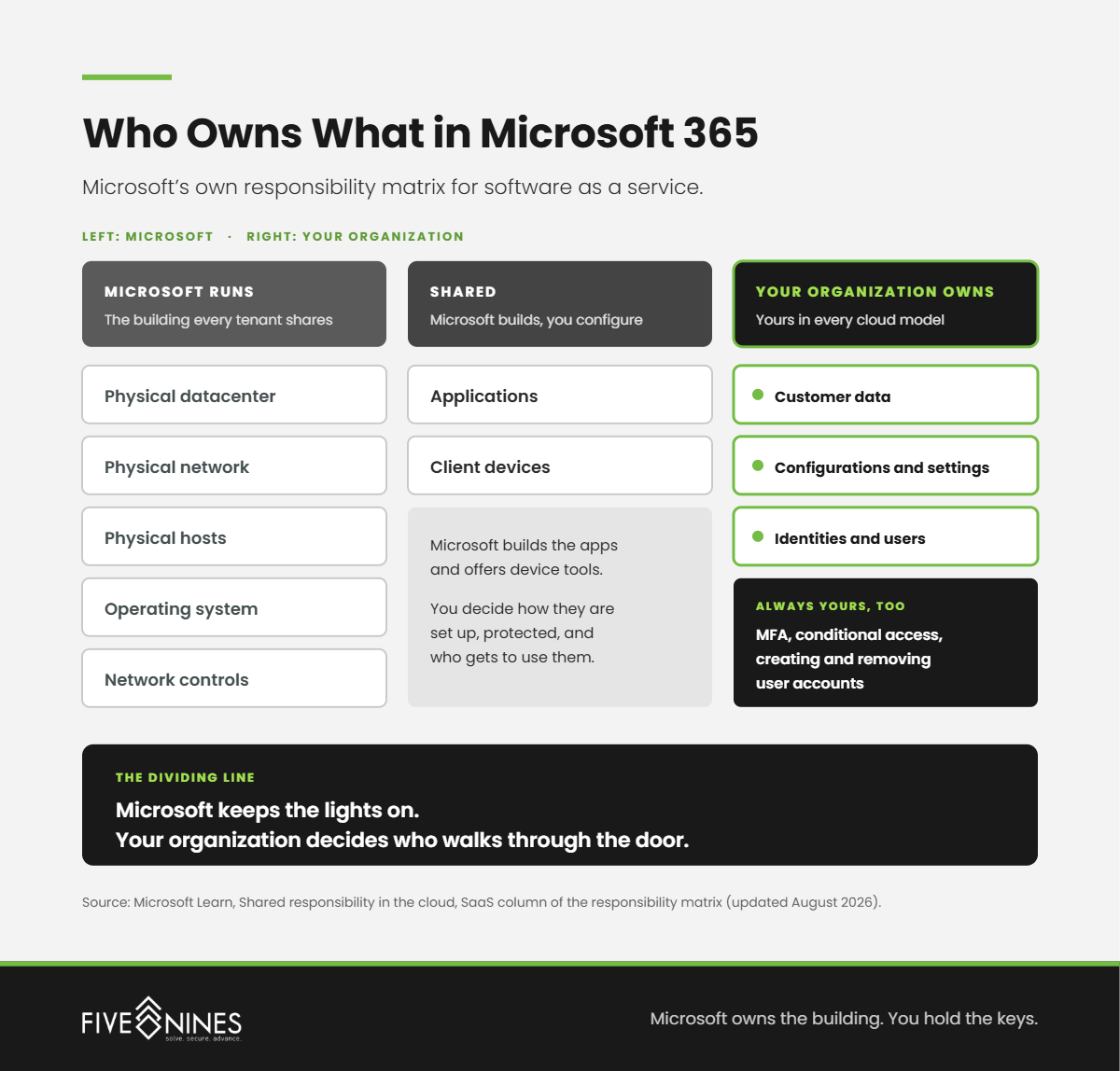
Microsoft says so in writing. Its shared responsibility matrix on Microsoft Learn lists customer data, configurations and settings, and identities and users as the customer's responsibility in every cloud model, including software as a service like Microsoft 365.
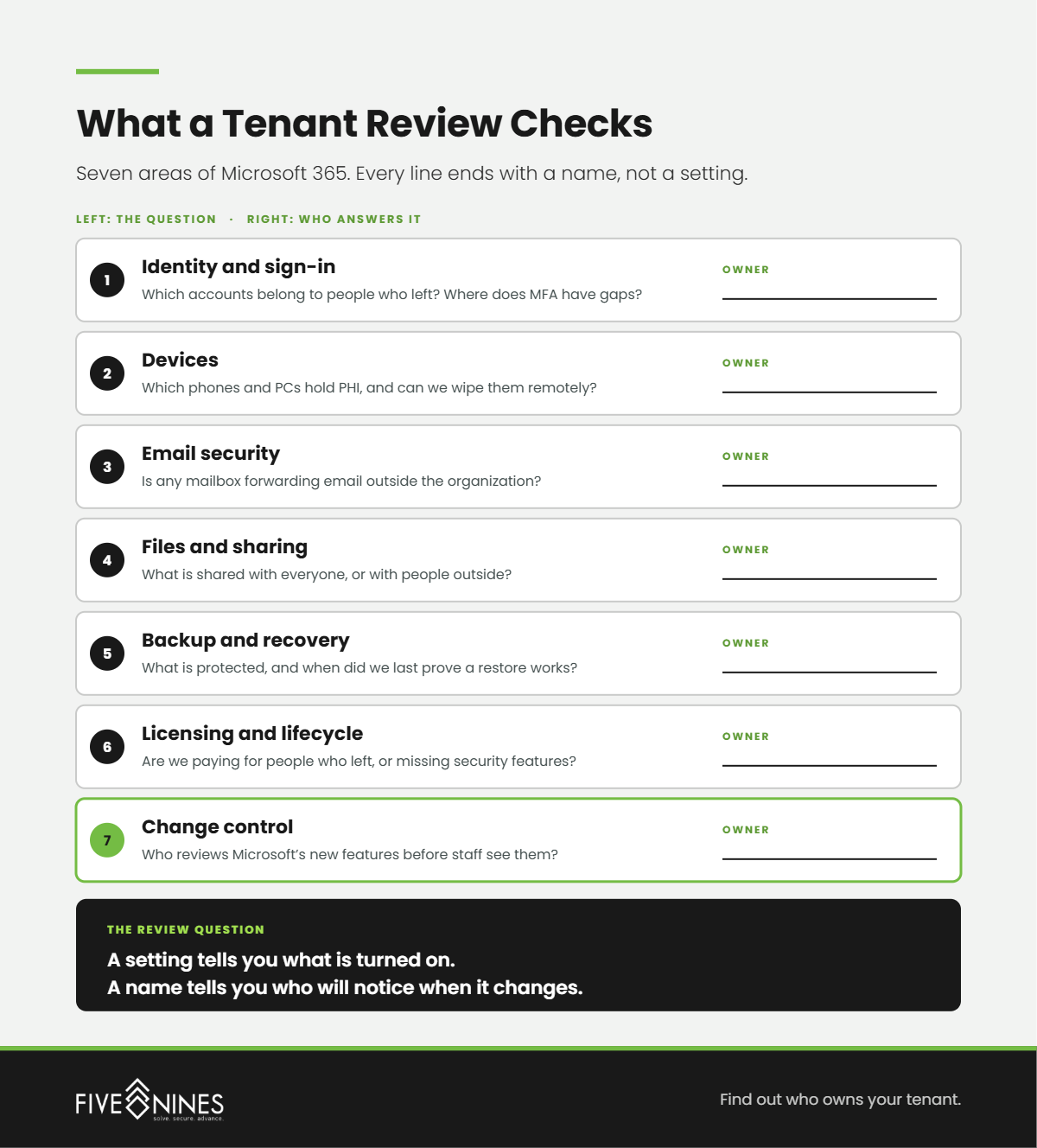
Short answer: Microsoft 365 management covers seven areas: identity and sign-in, devices, email security, files and sharing, backup and recovery, licensing, and change control. Five Nines Technology Group treats them as one system, because a gap in any single area, like a missing MFA policy or an open sharing link, undoes the protection in the others.
|
Area |
What it covers |
What happens when nobody owns it |
|---|---|---|
|
Identity and sign-in |
Multifactor authentication, Conditional Access, admin roles, onboarding and offboarding |
Former staff keep working credentials, and one stolen password opens a mailbox |
|
Devices |
Intune enrollment, encryption, update compliance, remote wipe |
A nursing station PC or personal phone holds PHI with no way to wipe it |
|
Email security |
Phishing and spoofing protection, forwarding rules, mailbox auditing |
A compromised mailbox quietly forwards patient or payment email |
|
Files and sharing |
SharePoint, OneDrive, and Teams permissions, external sharing, sensitivity labels |
Credentialing or HR files sit open to every employee |
|
Backup and recovery |
Point-in-time backup, retention, restore testing |
Ransomware or a bad sync leaves no clean version to restore |
|
Licensing and lifecycle |
License assignment, renewals, removal of unused seats |
You pay for departed staff while active users lack security features |
|
Change control |
Tracking Microsoft's feature releases and default settings |
New features switch on with defaults nobody reviewed |
Most organizations have pieces of this in place. A vendor set up email years ago. Someone turned on MFA during a cyber insurance renewal.
What is usually missing is the owner: one accountable party who watches all seven areas and adjusts them as the organization changes.
Short answer: Microsoft manages the datacenters, physical network, servers, and application code. Its published shared responsibility matrix keeps customer data, configurations and settings, and identities and users with the customer in every deployment model, including Microsoft 365. Microsoft keeps the lights on. Your organization decides who walks through the door and what they can open.
The confusion is understandable. Microsoft 365 updates itself, so it feels managed. An update to the service is still not a decision about your tenant.
Microsoft's list of responsibilities you always retain is specific: protecting and classifying data, securing the devices that connect, creating and removing user accounts, and managing access, including multifactor authentication and conditional access policies. None of those transfer when you buy the license.
What Leadership Misses
Buying Microsoft 365 moved your servers to Microsoft. It did not move your decisions. Every setting in the tenant is either a choice someone made or a default nobody reviewed.
Short answer: No software is HIPAA compliant on its own. Microsoft offers a Business Associate Agreement covering in-scope services such as Exchange Online, SharePoint Online, OneDrive for Business, and Microsoft Teams. Microsoft also states that the BAA alone does not make your organization compliant. Configuration, access control, and audit evidence stay with the hospital.
On its HIPAA and HITECH compliance page, Microsoft says the BAA is available by default through its Data Protection Addendum to customers who are covered entities or business associates. Asked in the same FAQ whether a BAA makes an organization compliant, Microsoft answers no, and places responsibility for the compliance program and the specific use of its services on the customer.
That matters the day an auditor asks who could open a mailbox containing PHI, when MFA was enforced, or what was shared outside the organization. Those answers come from your tenant's configuration and audit logs, and someone on your side has to keep them in order.
The Hidden Risk
A signed BAA shows Microsoft will safeguard PHI on its side of the line. It says nothing about who on your side of the line can open it.
Short answer: Microsoft keeps redundant copies of Microsoft 365 data for disaster recovery, but its own documentation says those copies hold the current state of your content, not earlier versions. Point-in-time backup is a separately billed product. If ransomware encrypts files or a bad sync deletes a folder, recovery depends on backup someone configured and tested.
In its Microsoft 365 Backup FAQ, Microsoft explains that version history helps individual users but does not scale to an organization-wide ransomware recovery, and that versions can run out depending on limits an admin sets. The same FAQ confirms Microsoft's position on shared responsibility for data protection has not changed.
The FBI's 2025 Internet Crime Report recommends off-site or offline backups that are encrypted, immutable, and cover the organization's entire data infrastructure.
Managing backup comes down to three decisions: what gets protected (mailboxes, SharePoint, OneDrive, and the files behind Teams), how long it is kept, and when someone last proved a restore works.
Short answer: Nothing happens automatically. The account, mailbox, OneDrive files, forwarding rules, signed-in sessions on phones, and sharing links stay in place until someone disables, transfers, or revokes them. Hospitals with travel nurses, rotating residents, and seasonal staff need offboarding tied to the HR process, not a ticket someone remembers to open.
Email is where money and patient information move, which makes it the account attackers want. The FBI's 2025 Internet Crime Report counted 24,768 business email compromise complaints and more than $3.04 billion in reported losses, the second costliest category in the report. The FBI defines BEC as fraud carried out by compromising email accounts to redirect payments.
Multifactor authentication is the strongest single control here. A Microsoft Research study of Azure Active Directory accounts found MFA reduced the risk of compromise by 99.22% across the population studied. That protection covers the accounts you know about.
Five Nines Insight
MFA protects the accounts you remember. Offboarding protects the ones you forgot.
Short answer: Microsoft states that Microsoft 365 Copilot only surfaces organizational data a user already has at least view permission to see. That is a sound rule, and it is exactly as safe as your permissions. If credentialing files or patient lists are shared with the whole organization, Copilot can find and summarize them for any employee who asks.
Microsoft's own SharePoint guidance for Copilot acknowledges that users often save files without checking a folder's permissions and tend to share with large groups instead of individuals. Its recommended first steps include hiding the "Everyone except external users" option, reviewing organization-wide sharing links, and restricting inactive sites before Copilot goes live.
Copilot does not create an oversharing problem. It makes the existing one searchable.
For a hospital, the order is permissions review first, Copilot second.
Short answer: The Five Nines Tenant Ownership Ladder sorts Microsoft 365 environments into four stages by one question: who owns the tenant? Licensed tenants have no owner. Configured tenants had one once. Managed tenants have a named owner and a routine. Governed tenants have an accountable partner and evidence an auditor can follow.
The Five Nines Tenant Ownership Ladder
|
Stage |
Who owns the tenant |
What it looks like on the floor |
What moves you up |
|---|---|---|---|
|
1. Licensed |
Whoever bought the subscription |
Email works. Nobody can say how many global admins exist or whether MFA covers every account. |
A cyber insurance questionnaire you cannot answer |
|
2. Configured |
The vendor or employee who set it up |
MFA and basic policies were turned on once and never reviewed. Departed staff still appear in the user list. |
Turnover, a new clinic, or a new Microsoft feature |
|
3. Managed |
A named owner with a recurring checklist |
Offboarding follows HR. Sign-in alerts get watched. Licenses are reconciled every month. |
An audit, a board question, or a Copilot rollout |
|
4. Governed |
An accountable partner with documented controls |
Permissions are reviewed before new apps go live. Restores are tested. Every change leaves a record an auditor can follow. |
Sustaining it as the organization grows |
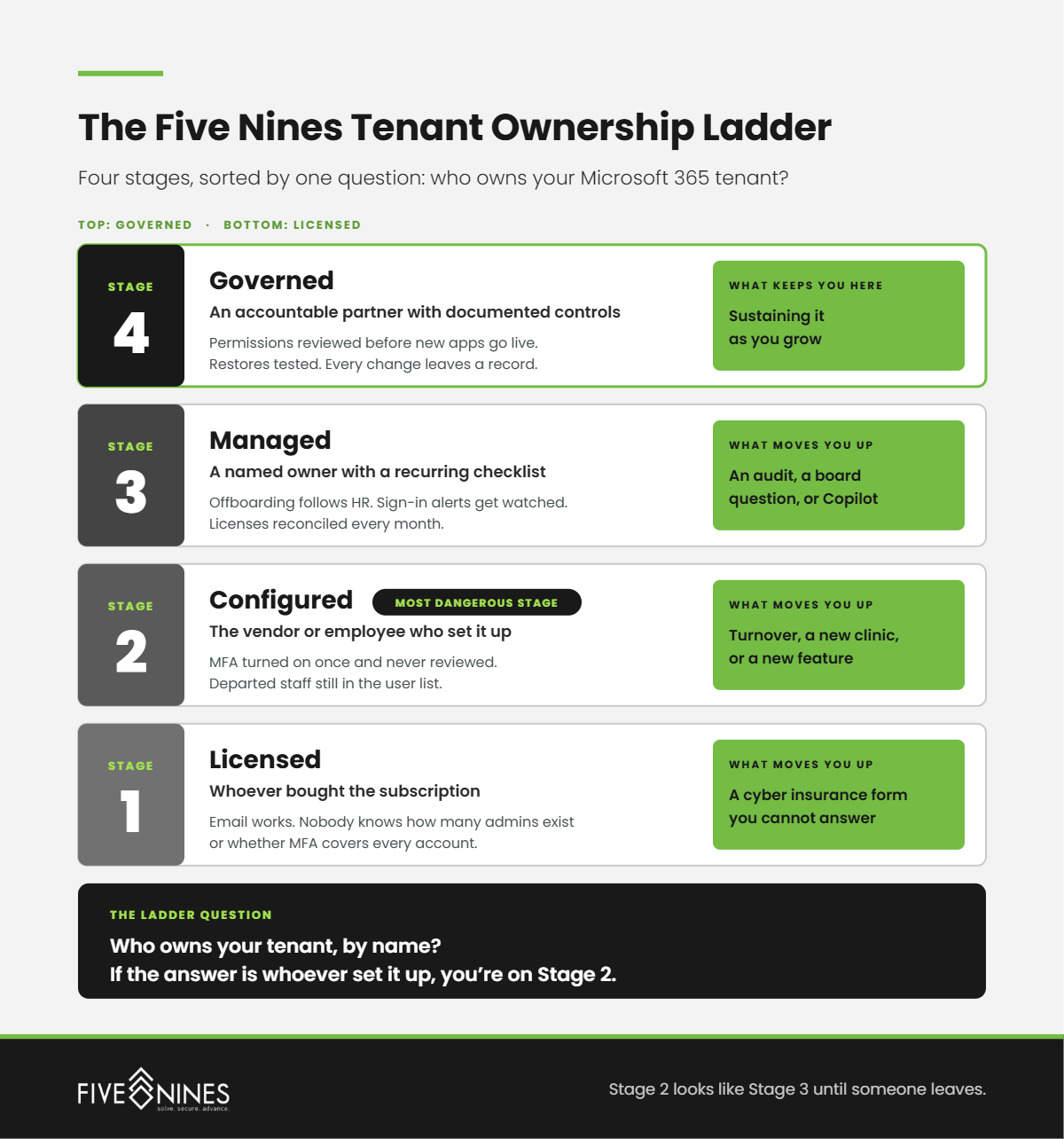
Stage 2 is the most dangerous stage on the ladder. From the outside it looks like Stage 3, because the settings were right on the day someone set them. Then people leave, Microsoft ships new features, and nobody is assigned to notice.
Short answer: The patterns Five Nines engineers look for are rarely exotic. They are ordinary decisions that were never revisited: accounts that outlived employees, admin rights granted during troubleshooting, MFA exceptions labeled temporary, and sensitive folders shared with the whole organization because it was faster.
Short answer: Ask questions that force a name and a date. Who owns our tenant, how often do they review it, when did they last test a restore, and what evidence will we have for an auditor? A provider who answers with a product list instead of a person and a process is selling licenses, not management.
If you could not answer the ladder questions above with a name, your tenant is running on defaults and memory.
A Five Nines Microsoft 365 tenant review identifies:
You leave with your stage on the Tenant Ownership Ladder, a prioritized fix list, and an owner for every item.
Microsoft will keep Microsoft 365 running. The question is whether anyone is keeping it yours.
The managed IT services that help a small business replace Dropbox with secure server storage are private cloud hosting, identity and access control,...
The best Midwest IT support for a rural hospital is the provider that covers all five lanes of risk: staff devices, clinical systems, 24/7 security...
Any IT vendor that creates, receives, maintains, or transmits protected health information (PHI) on your behalf is a HIPAA business associate and...