A rural hospital needs onsite IT support when the problem is physical, when the failure cuts off remote access to the site, or when several locations need help at once. Password resets, EHR access, and patching can be handled remotely. A dead network switch in a clinic 40 miles from the main campus cannot.
Here is what that looks like on a Tuesday. The clinic in the next county opens at 8:00. Patients are already in the lobby. The front desk cannot check anyone in, the provider cannot open a chart, and the e-prescribing screen just spins. The help desk tries to connect to the clinic's firewall and gets nothing back.
A remote fix needs a working network. Sometimes the network is what broke.
That is the moment "local presence" stops being a sales phrase and becomes a drive time. It matters more in rural healthcare than almost anywhere, because rural hospitals rarely run a single building. The Kansas Department of Health and Environment, in its Rural Health Transformation plan, reports that nearly all rural health clinics in the state are affiliated with the local hospital. Every one of those clinics has its own network closet, its own workstations, and its own distance from help.
Can a Rural Hospital Rely on Remote-Only IT Support?
Short answer: Not completely. Remote support from a managed provider like Five Nines Technology Group can resolve many everyday tickets without anyone getting in a car. But remote tools need a working connection to the site, and they cannot touch hardware. When a clinic's switch, firewall, or internet circuit fails, remote reach fails with it.
Most hospital leaders picture IT support as a phone call. Someone answers, takes control of the screen, and fixes the problem. That model works well for a large share of the day: locked accounts, EHR access errors, printer queues, software updates, and the monitoring alerts nobody on the floor ever sees.
The gap shows up in two places. The first is anything physical: a failed power supply, a dead switch port, a workstation that will not boot. The second is subtler. Remote support travels over the same network it is trying to fix. If the failure is the network itself, the help desk is looking at a blank screen too.
Five Nines pairs 24/7 remote monitoring and help desk support with onsite technicians for exactly this reason. Remote handles the volume. Onsite handles the moments remote cannot reach. For the broader service picture, see which managed IT services support growing healthcare organizations.
The Hidden Risk
Remote-only support fails at the worst possible moment. The outage that stops your clinic is often the same outage that blinds the people trying to fix it.
Which IT Problems Need Someone Onsite at a Rural Hospital or Clinic?
Short answer: Problems that are physical, that cut off remote access, or that hit several sites at once need someone onsite. The Five Nines Four Distances Model sorts every IT problem into one of four levels, from fixes that happen remotely in minutes to events that need several technicians at several locations on the same day.
The useful question is not "remote or onsite?" It is "how far does help have to travel for this problem?" Each distance has a different bottleneck, and a different thing a hospital can do in advance to shorten it.
The Five Nines Four Distances Model
|
Distance |
What it covers |
What it looks like on the floor |
What decides how fast it gets fixed |
|---|---|---|---|
|
1. Remote Reach |
Password resets, EHR and application access, patching, printer queues, monitoring alerts, most software issues |
A nurse is locked out at shift change. The help desk resets her account before the next patient is roomed. |
Help desk answer time and true 24/7 coverage |
|
2. Guided Hands |
Simple physical steps a staff member can take while an engineer guides by phone: reseating a cable, power cycling a device, swapping in a labeled spare |
The lab manager reseats the analyzer interface cable while an engineer watches the connection come back. |
Labeled equipment, current site documentation, and spares on the shelf |
|
3. Dispatched Technician |
Failed switches, firewalls, or circuits that cut off remote access; workstation and server hardware; network closet work; new device installs |
A clinic's switch dies. Nothing at the site can reach the internet, including the remote tools. |
Drive time from the provider's nearest staffed office to that specific site |
|
4. Surge Reach |
Events that need several people at several sites at once: ransomware recovery, an EHR go-live, storm damage, a workstation refresh across clinics |
Four clinics need re-imaged workstations before Monday clinic hours. |
How many trained people the provider can send at the same time |
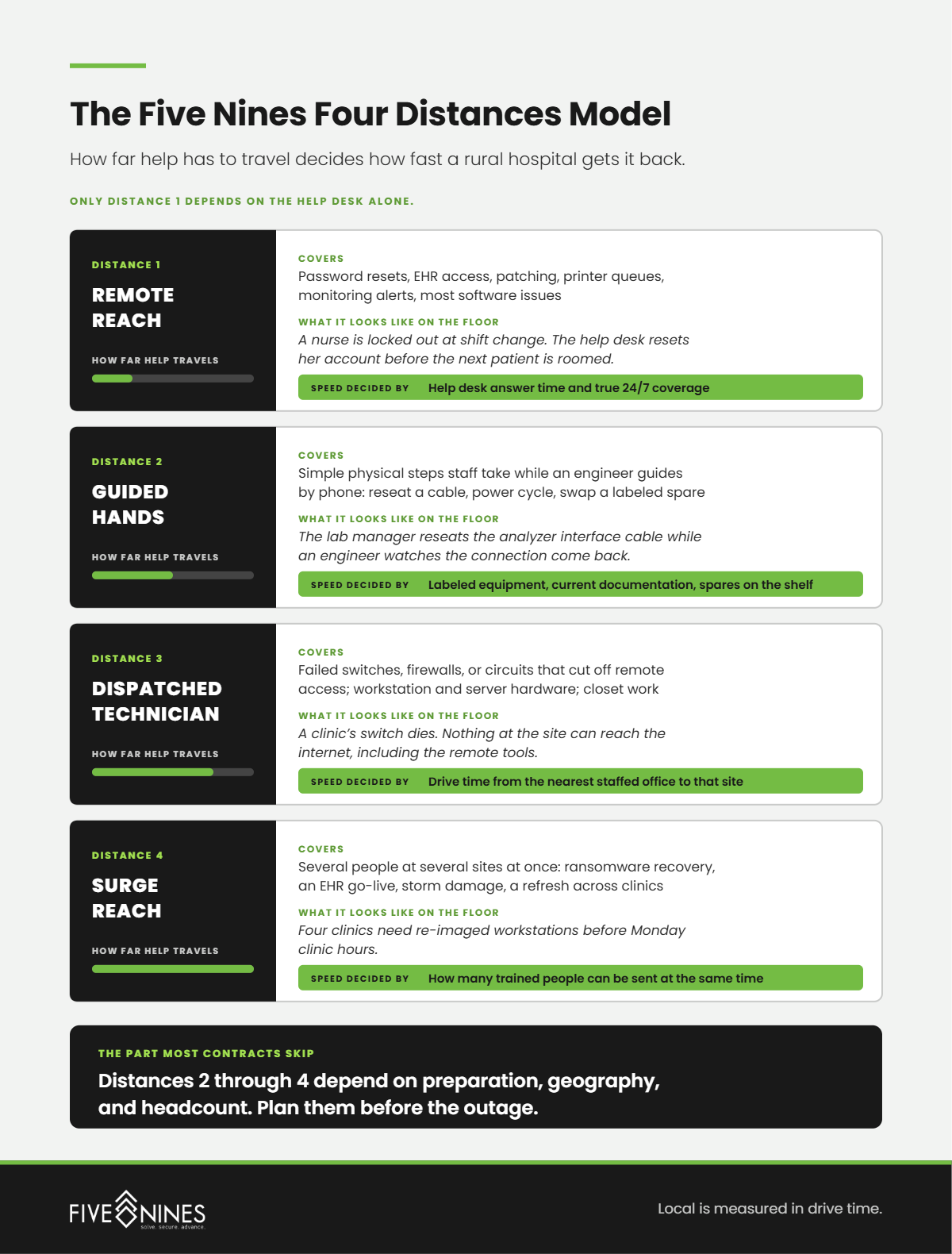
Notice that only the first distance depends on the help desk alone. The other three depend on preparation, geography, and headcount. Those are the parts of IT support most contracts never mention.
Why Do Multiple Clinic Locations Change the IT Support Math?
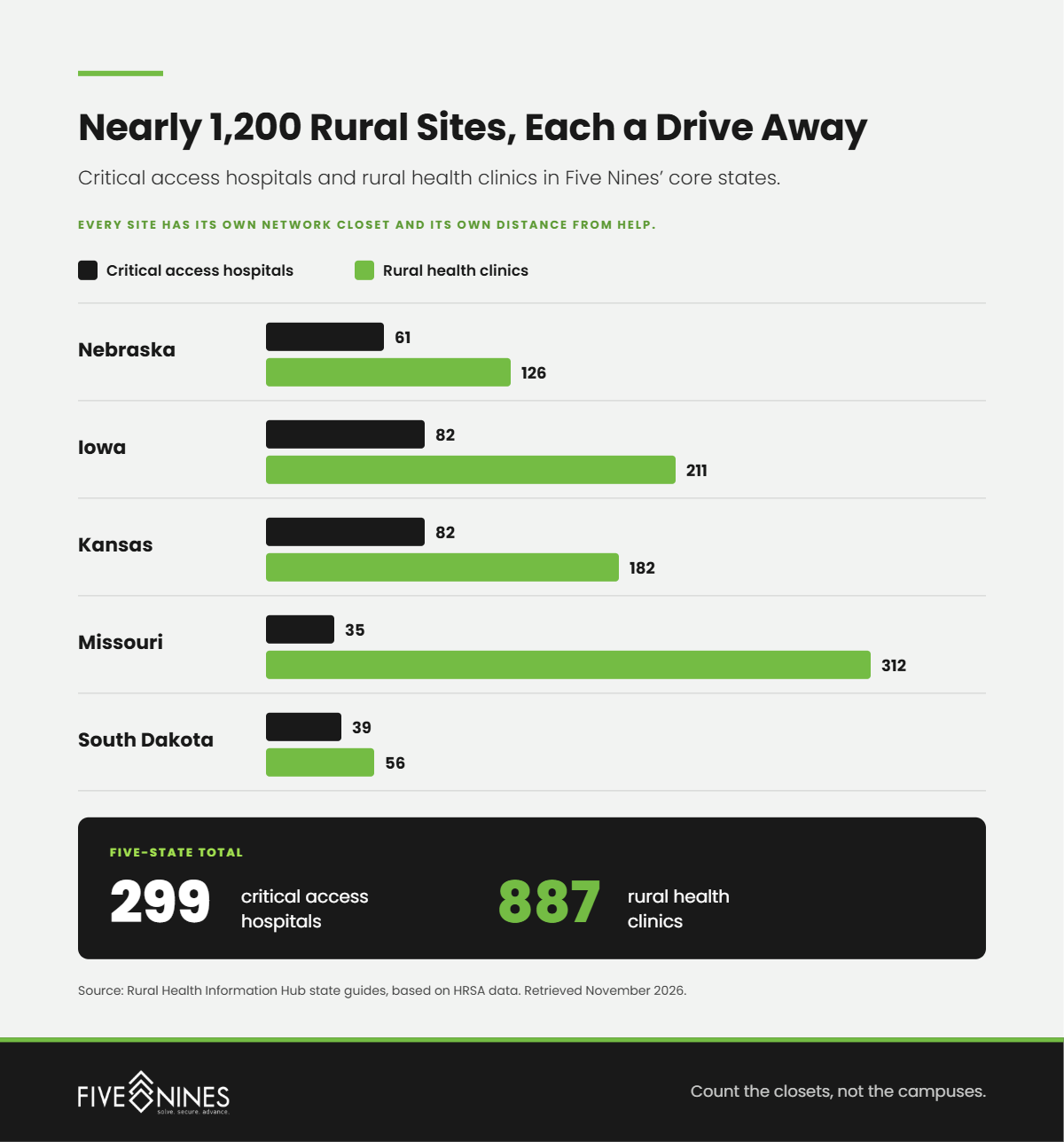
Short answer: Every clinic a rural hospital runs adds another network closet, another set of workstations, and another drive time. Across Nebraska, Iowa, Kansas, Missouri, and South Dakota there are 299 critical access hospitals and 887 rural health clinics, according to the Rural Health Information Hub. In Kansas, nearly all rural health clinics are affiliated with the local hospital.
A critical access hospital is rural by design. The Centers for Medicare & Medicaid Services generally requires one to sit more than 35 miles from the nearest hospital. Then add the clinics. A hospital with a main campus and three outlying clinics does not have one IT environment. It has four, each a different distance from help.
|
State |
Critical access hospitals |
Rural health clinics |
|---|---|---|
|
Nebraska |
61 |
126 |
|
Iowa |
82 |
211 |
|
Kansas |
82 |
182 |
|
Missouri |
35 |
312 |
|
South Dakota |
39 |
56 |
|
Five-state total |
299 |
887 |
Source: Rural Health Information Hub state guides (Nebraska, Iowa, Kansas, Missouri, South Dakota), based on HRSA data, retrieved November 2026.
The staffing side makes it harder. The Health Sector Coordinating Council's 2025 report On the Edge found that only 14% of healthcare organizations say their IT security teams are fully staffed. A hospital that already struggles to staff one building rarely has the people to cover four.
What Leadership Misses
One excellent local technician is still one person. If they are at the clinic in one town when the switch fails in another, you have the same single point of failure you had with one internal IT hire.
What Does "Local" Actually Mean When You Choose an IT Provider?
Short answer: Local means two numbers: how long it takes a technician to reach your farthest site, and how many technicians can arrive at once. An office address answers neither. Five Nines Technology Group is headquartered in Lincoln, Nebraska, with offices in Omaha, Kearney, Central City, and St. Louis.
Most hospitals ask a provider, "Do you have local techs?" Nearly every provider says yes. The better question is specific: "How long until someone is standing in the network closet at our clinic in [town], and how many people can you send if all four sites go down?"
The answer depends on where staffed offices sit relative to your sites, not where the company is incorporated. A provider 20 minutes from your main campus can still be two hours from your farthest clinic.
Five Nines includes onsite support in its managed IT services, with SLA-bound response for critical issues. Onsite coverage is regional, centered on Nebraska, Iowa, Kansas, Missouri, and South Dakota. Remote support, security monitoring, and compliance services reach further.
Five Nines Insight
Ask for the drive time, not the office address. Local presence is measured in minutes to your farthest site and the number of people who can show up at once.
How Should a Rural Hospital Plan Onsite Coverage Before Something Breaks?
Short answer: Plan each of the four distances in advance. Map every site's drive time, decide which failures trigger an automatic dispatch, make simple fixes possible for local staff, stage spares where the drive is longest, and book surge capacity for known events like an EHR go-live.
Most onsite delays are decided months before the outage, by what was or was not written down. Six steps shorten every distance:
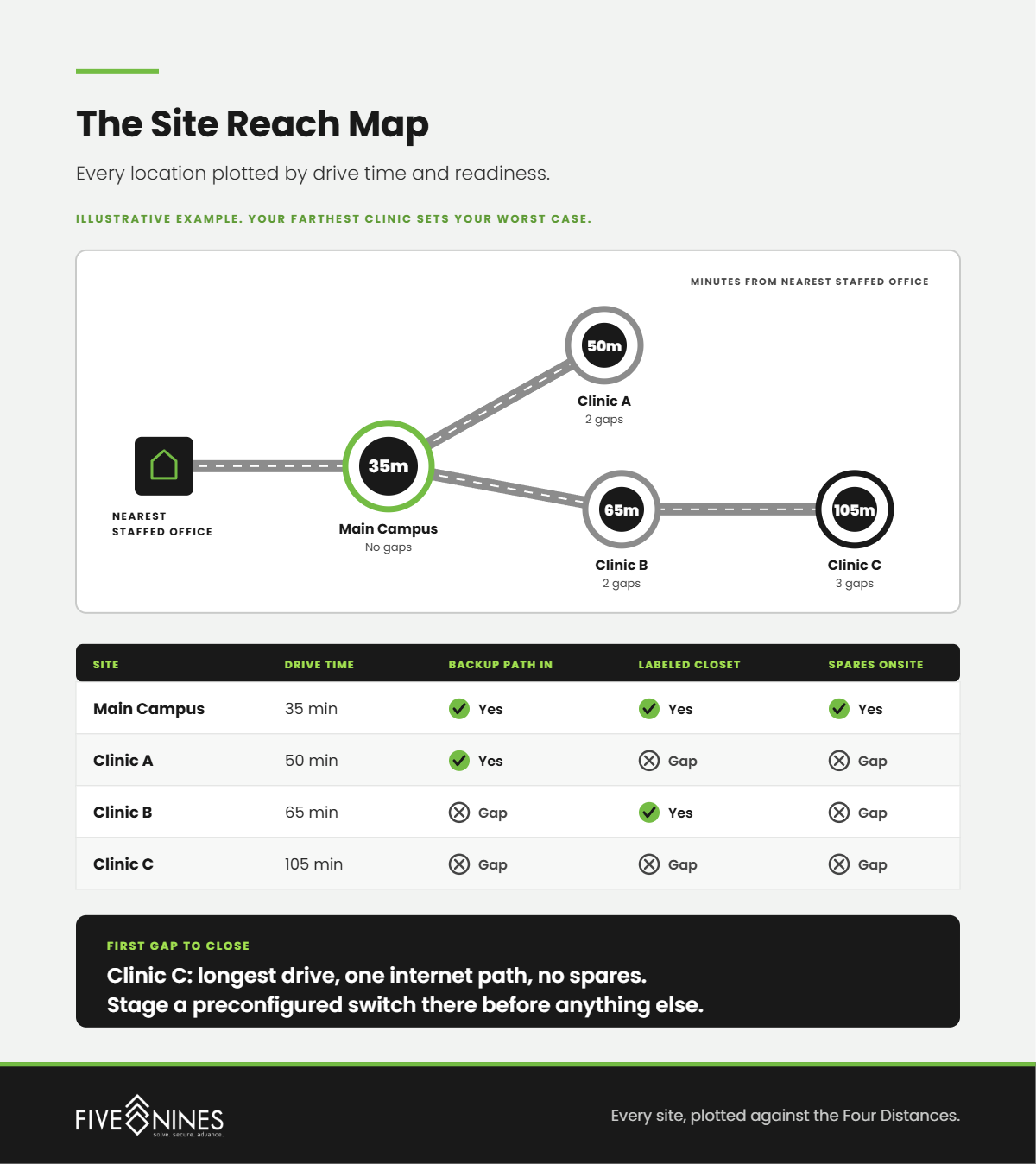
- Map every site with its drive time. Measure from your provider's nearest staffed office, not its headquarters. Your farthest clinic sets your worst case.
- Write dispatch triggers into the agreement. A network outage at any site, an EHR outage at a clinic, or a failed clinical device interface should send a technician without a second phone call.
- Make Guided Hands easy. Label every closet, keep a current network diagram, and name a point person at each site who can follow instructions by phone.
- Stage spares where the drive is longest. A preconfigured switch or a spare workstation on the shelf can turn a long wait into a short fix.
- Give remote tools a second way in. A cellular backup connection to a clinic's firewall can keep remote access alive when the main circuit fails. Our post on what happens when a rural hospital loses internet access covers this in depth.
- Book surge capacity before you need it. EHR go-lives, refresh projects, and incident response should have named people and dates, not a promise to "send whoever is free."
What Does Five Nines Look for When Mapping a Rural Hospital's Sites?
Short answer: Five Nines looks for the small gaps that turn a quick fix into a long drive: unlabeled network closets, clinics with a single internet connection, satellite sites that missed the last hardware refresh, and spare equipment stored in the wrong building.
- The unlabeled closet. Clinic network equipment with no labels and no current diagram. A five-minute guided fix becomes a dispatch because nobody onsite can tell which cable is which.
- The single path in. One internet circuit at a clinic and no backup. When that circuit drops, the remote tools lose the site along with everyone else.
- The forgotten clinic. Satellite sites running older workstations and switches than the main campus, because nobody from leadership walks past them every day.
- Spares in the wrong building. Spare equipment kept at the main campus, a long drive from the clinic most likely to need it.
- Dispatch by phone tree. No written trigger for onsite response, so the decision to send someone waits on whoever happens to answer.
What Should a Rural Hospital Ask an IT Provider About Onsite Support?
Short answer: Ask questions that force a number. Drive time by site, what happens when remote access is lost, how many technicians can respond at once, and which failures trigger an automatic dispatch. Vague answers here usually mean the coverage plan does not exist yet.
- How long does it take your nearest staffed technician to reach each of our sites? Show me by site, not by region.
- If our clinic's network goes down and you cannot connect remotely, what happens in the first 30 minutes?
- How many technicians can you send on the same day if three of our sites need help at once?
- Which failures trigger an automatic onsite dispatch, and where is that written in our agreement?
- Who keeps our site documentation current, and can our staff use it during a guided fix?
How Far Is Your Farthest Clinic From the Nearest Technician?
If you run more than one site, you already know which clinic worries you most when the network goes quiet. A Five Nines site reach assessment puts a number on that worry and a plan behind it.
The assessment identifies:
- The drive time from Five Nines' nearest staffed office to every one of your sites
- Which systems at each site lose remote access when the main circuit fails
- Where staff can handle a guided fix today, and where missing labels or diagrams would force a dispatch
- Which spares to stage at which site, starting with the longest drive
- A surge plan for known events like an EHR go-live or a workstation refresh
You leave with a Site Reach Map: every location plotted against the Four Distances, with the gaps ranked by patient impact.
Remote support decides how fast most problems get fixed. Drive time decides how bad the worst one gets.